How often should you update your net worth?
For most people, calculating net worth once a month is enough, with each account updated about as often as its balance actually changes. A current account changes every week, a pension statement might arrive a few times a year, and the value of a car only needs looking at once a year.
How often to update each account
A rough guide by account type:
- Monthly: current and savings accounts, brokerage, crypto, credit cards
- Quarterly: pensions, loans you pay down on a schedule
- Yearly: a home, a car, art, deposits
Month-end works well because statements line up with it, and twelve figures a year is enough to show a trend without the daily ups and downs.
Updating daily or weekly
Investments go up and down every day for reasons that have nothing to do with you. Take Jonas, who lives in Hamburg and has six accounts, including EUR 96,000 in a brokerage account. A 1% move on one day is EUR 960 either way, so his total might go up EUR 900 one day and down EUR 1,400 the next. On a daily chart those swings are most of what you see, and the EUR 500 he saves each month is hard to make out.
Updating weekly takes longer than it's worth for most accounts. Updating all six of Jonas's accounts every week at two minutes each would be 6 × 52 × 2 = 624 minutes a year, a bit over 10 hours. A good share of that would be typing the same number for the car and the flat.
If you're about to buy a home or are paying off a debt, checking those particular accounts weekly for a while can make sense, while the rest stay monthly.
Updating once a year
With one figure a year you can see how much your net worth changed, but not why. If your net worth rose EUR 20,000, that could have been steady saving, one good month in the market or a new estimate for the flat. With monthly figures you can see which.
A monthly routine is also easier to keep up, because a once-a-year update is easy to skip if December is busy.
Matching the rhythm to the account
For each account, ask how often a new number exists.
| Account | Balance | Rhythm | Why |
|---|---|---|---|
| Current account | EUR 8,400 | Monthly | Changes every week |
| Savings account | EUR 22,000 | Monthly | Changes when you save |
| Brokerage | EUR 96,000 | Monthly | Market moves daily, monthly smooths it |
| Pension | EUR 71,000 | Quarterly | Provider updates the figure a few times a year |
| Flat | ≈ EUR 310,000 | Yearly | Your estimate, from sales nearby |
| Car | ≈ EUR 12,500 | Yearly | Loses value slowly and predictably |
Three monthly accounts, one quarterly and two yearly is 3 × 12 + 4 + 1 + 1 = 42 updates a year. At two minutes each, that's 84 minutes a year, about seven a month.
If your pension provider only sends a statement once a year, updating it monthly would mean typing the same figure twelve times. The guide on valuing illiquid assets covers where the numbers for a home, car and foreign pension come from.
Knowing which numbers are out of date
Updating some accounts rarely is fine, as long as you know which numbers are old.
Say it's October, and Jonas updated his monthly accounts on 30 September. His pension figure is from March, which is past its quarterly rhythm, and his car value is from last October, past its yearly one. His total is EUR 519,900, but EUR 83,500 of that (pension plus car) is out of date, so 436,400 ÷ 519,900, or about 84%, of his total is current.
That doesn't make the total wrong, but he can see that about a sixth of it rests on older figures.
In a spreadsheet, add a "last updated" column and a rhythm column next to each account, and a formula that flags any row where the date is older than the rhythm allows.
What changes with several currencies
With money in more than one currency, your total moves every day even when you update nothing, because exchange rates move. A pension balance from March converted at an October rate is a fair estimate of its value today, as long as the balance itself hasn't changed.
It helps to keep "the rate changed" separate from "the balance changed". The guide on the currency effect shows how to split them, and the one on tracking net worth across currencies covers which rate to use on which date.
Updating after a big change
Some events change your total enough that it's worth updating straight away rather than waiting for month-end:
- you sell or buy a property, or take out a new mortgage
- you pay off a loan, or take one on
- you move a large amount between countries
- an inheritance or a bonus lands
When that happens, update the accounts on both sides on the same day. If Jonas moves EUR 20,000 from savings to his brokerage account and only updates the brokerage, his total will look EUR 20,000 too high for a month.
A monthly routine
Jonas updates his accounts on the first Saturday of each month, with a calendar entry to remind him. He updates the three monthly accounts and checks whether the pension or the car is due. Then he looks at the change from last month and writes a short note next to it if something unusual happened, such as "bonus", "paid off card" or "car insurance". On average it takes him about seven minutes a month.
If you miss a month, it's better to leave it out than to fill it in from memory, because one missing month doesn't spoil the trend.
If you're starting from scratch, the free net worth spreadsheet template has one column per month-end. For what to record for each account and where to find it, see tracking net worth without linking your bank.
Update rhythms in Thallo
In Thallo each account has its own update rhythm, from weekly to yearly, so you can set the rhythms from the table above account by account. Jonas could set his current account, savings and brokerage to monthly, the pension to quarterly, and the flat and car to yearly.
Each account shows when you last updated it, and is marked as out of date once it's past its rhythm. The overview shows how much of your total is up to date, for example "84% up to date", next to your net worth, the change since last month-end and a 12-month trend.
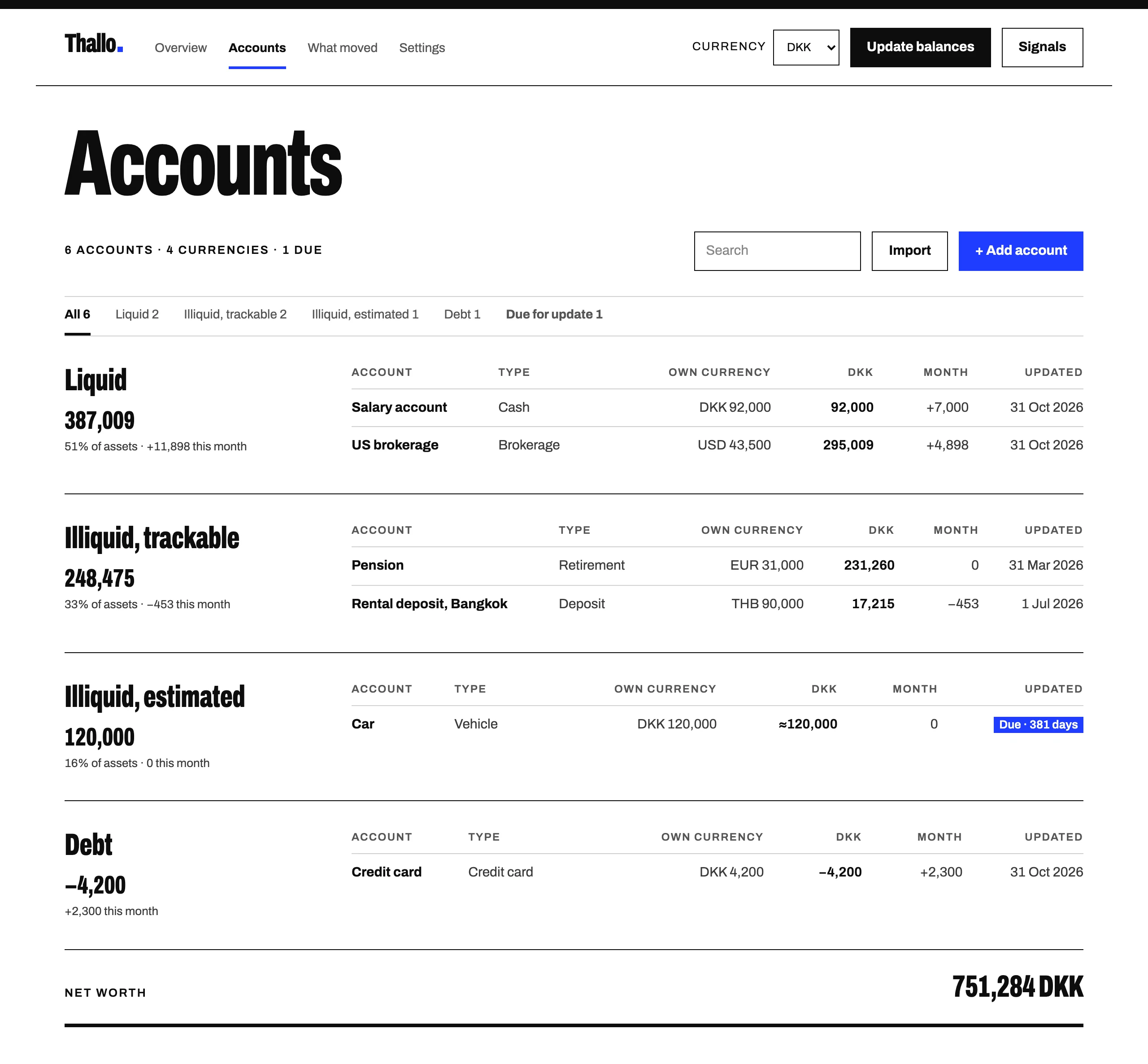
On the first Saturday of the month he'd type in his three monthly balances on one screen, which takes a few minutes. Thallo doesn't send reminders, so a calendar entry like Jonas's is still worth setting.
Start free. The rhythm is one setting per account, and you can change it later.