How to track your net worth without linking your bank
You can keep an accurate net worth without connecting any app to your bank. You need one balance per account, typed in every month or so, either into a spreadsheet or into a net worth tracker that doesn't link to banks. For nine accounts that comes to about two hours a year, and the total is just as accurate as one built from bank connections.
What linking a bank involves
When an app "syncs" with your bank, it uses an aggregator, which is a company that connects to banks on the app's behalf. In the UK and EU this usually goes through open banking, where you approve read access at your bank. In other places it can still mean handing over your login. In both cases a third party has ongoing access to your balances and usually your transactions.
Plenty of people are comfortable with that. Others prefer not to link their bank, for reasons like these:
- They don't want a record of every purchase held by an app they only use to check a total.
- Connections need upkeep. Under EU rules, open-banking access has to be renewed with your bank regularly, currently every 180 days, and smaller banks and foreign banks are often not covered at all.
- Some accounts can't be linked in any case, such as a car, a rental deposit and often a pension.
Most people who use bank syncing still type some numbers in by hand.
What to record
For a net worth figure you need one balance per account on a given date. You don't need transactions or a list of holdings.
As an example, take Priya, a physiotherapist in Leeds. She has nine accounts: six with UK banks and providers, plus some crypto, a car and the deposit on a flat she rented in Porto. Here is her whole list on 31 October:
| Account | Type | Balance |
|---|---|---|
| Current account | Cash | GBP 2,340 |
| Savings account | Cash | GBP 11,800 |
| Stocks and shares ISA | Brokerage | GBP 23,450 |
| Crypto wallet | Crypto | GBP 1,120 |
| Workplace pension | Retirement | GBP 38,600 |
| Rental deposit, Porto | Deposit | EUR 1,800 |
| Car | Vehicle | ≈ GBP 7,500 |
| Student loan | Loan | GBP 27,900 |
| Credit card | Credit card | GBP 640 |
Each number comes from somewhere she already looks: her banking app, the ISA provider's home page, the pension website, the deposit receipt and a used-car price guide. She doesn't need to know which funds are inside the ISA, because the provider shows the total at the top of the page and that's the number she types in.
Working out the total
Add up the assets and subtract the debts. The deposit is in euros, so it needs converting first. At an illustrative rate of 1 EUR = GBP 0.85, it's GBP 1,530.
- Assets: 2,340 + 11,800 + 23,450 + 1,120 + 38,600 + 1,530 + 7,500 = GBP 86,340
- Debts: 27,900 + 640 = GBP 28,540
- Net worth: 86,340 − 28,540 = GBP 57,800
Linking her bank would save her some typing, but the total would be the same.
How long updating by hand takes
Once you know where to look, finding a balance takes a minute or two per account, and a little longer the first time.
Priya doesn't need to update all nine accounts every month:
- The current account, savings, credit card, brokerage and crypto change often, so monthly makes sense for those five.
- The pension changes when the provider publishes a new figure, so quarterly is enough.
- The student loan goes down slowly and predictably, so quarterly works there too.
- The car and the deposit only need updating once a year, or when something changes.
Five accounts at two minutes each is ten minutes a month, or fourteen in the months when the two quarterly ones are due as well. Over a year it looks like this:
| Rhythm | Accounts | Updates a year |
|---|---|---|
| Monthly | 5 | 60 |
| Quarterly | 2 | 8 |
| Yearly | 2 | 2 |
| Total | 9 | 70 |
70 updates at about two minutes each comes to 140 minutes a year, a bit over two hours. The guide on how often to update your net worth goes into choosing these rhythms.
What you give up
You won't see what you spent on groceries. If that's what you're after, you want a budgeting tool, and most of those need a bank connection.
Your total is only as current as your last update. If you skip three months, those accounts will be three months old, so you need some way of knowing which numbers are out of date.
Your history also starts on the day you start recording, unless you go back through old statements.
In return, no one else holds your login or your transactions, and there are no connections to renew. Looking at each balance once a month can also help you spot an unexpected fee or an account you'd forgotten about.
Keeping it going
The usual problem with tracking by hand is that people fill in a spreadsheet for a few months and then stop. A few habits help.
Pick one day a month that's easy to remember, such as the first Sunday.
Next to each account, note where the balance can be found, for example "app, home screen" or "pension site, Statements tab". That makes the next update quicker.
If the car's value hasn't changed, record that you checked it. That way you can tell a figure you checked last month from one you haven't looked at in a year.
Keep track of which numbers are your own estimates (the car) and which are someone else's figure (the pension). The guide on valuing illiquid assets covers how to estimate a car and a property.
If you're starting in a spreadsheet, the free net worth spreadsheet template has a column for each month-end and a category for each account.
A net worth tracker that doesn't link to your bank
Thallo is a net worth tracker where you type in your balances, so it never needs your bank login. It doesn't connect to banks, brokers or exchanges, so it can't move money or see your transactions.
All of Priya's accounts would sit in one place, including the ones a bank connection couldn't reach: the car, the Porto deposit in euros and the pension. You add each account once, with its currency and how often you plan to update it, from weekly to yearly.
Updating is done on one screen that goes through all your accounts, one per screen on a phone. Last time's value is shown next to each, you type the new number or tap "No change", and your draft is saved if you close the page halfway through. Each account shows when you last updated it and is marked as out of date once it's past the rhythm you chose. On the overview you can see what share of your total is current, along with your net worth, the change since last month-end and a 12-month trend.
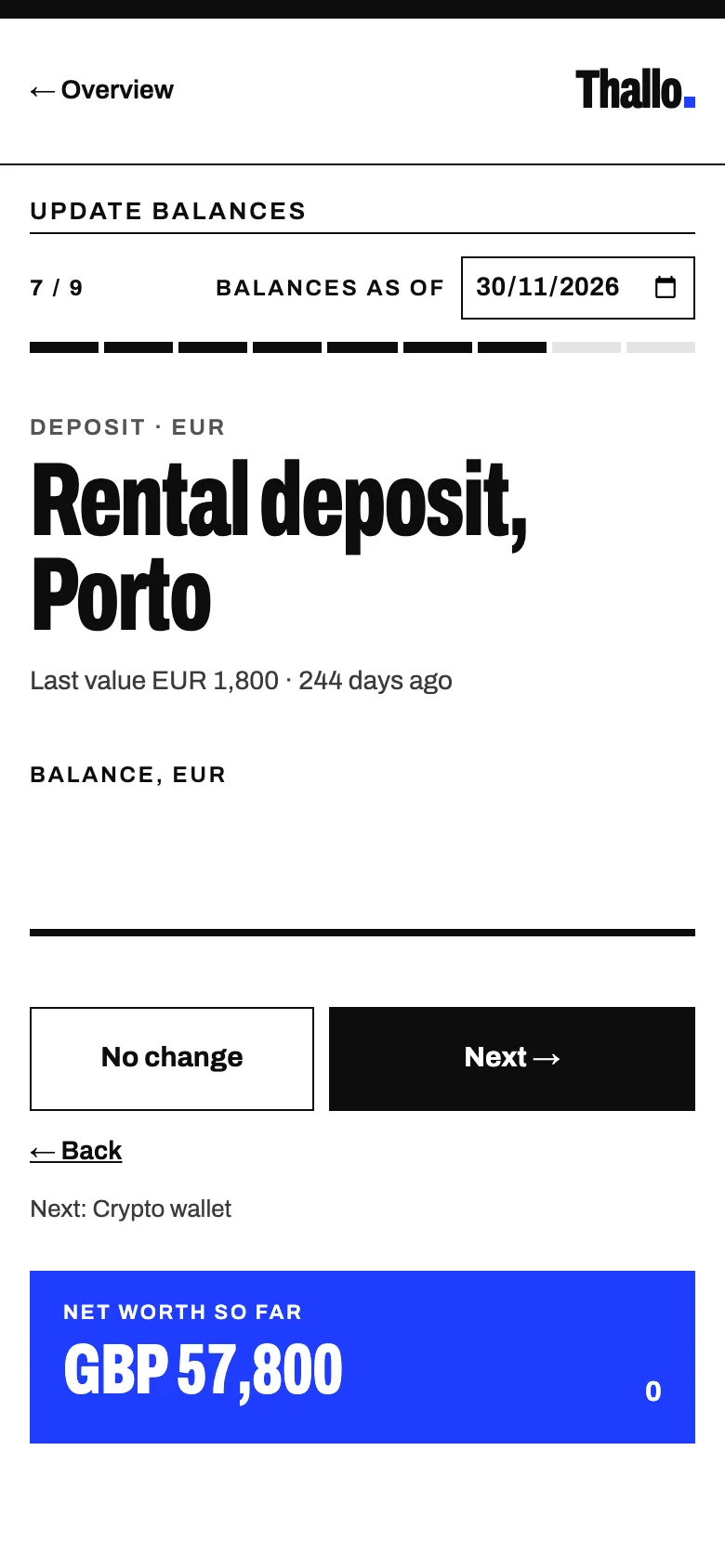
If you already keep a spreadsheet, you can import your history in Thallo's template format. Your browser reads the file, so the spreadsheet stays on your device and Thallo keeps only the balances.
Start free. You can add the accounts you know the balances of today and fill in the rest later.