How Thallo works
Thallo gives you your net worth across all your accounts, in one currency, and shows how it has changed over time. It splits each change into what came from your balances and what came from exchange rates, and it shows how up to date each number is.
You add each account once, with its own currency, and type in a new balance whenever you have one. Thallo converts everything at that day's exchange rate and adds it up. This page goes through the three steps and then each part of the app, using one illustrative example throughout.
Free during early access. No card needed.
Step 1: add your accounts
An account can be anything you own or owe, like a bank account, brokerage, pension, crypto wallet, rental deposit, car, flat, painting, loan or credit card.
For each one you choose a type, a currency and how often you expect to update it (weekly, monthly, quarterly or yearly). The types are Cash, Brokerage, Retirement, Crypto, Private credit, Deposit, Vehicle, Property, Art, Loan, Mortgage, Credit card, Other asset and Other debt. Each type belongs to one of four categories:
- Liquid: cash and savings accounts, brokerage accounts, crypto
- Illiquid, trackable: pensions and deposits, where someone else reports the number
- Illiquid, estimated: property, cars and art, where the number is your own estimate
- Debt: loans, mortgages and credit cards, entered as positive numbers and subtracted from the total
The example accounts
The examples on this page use this illustrative setup:
| Account | Type | Currency | Rhythm |
|---|---|---|---|
| Salary account | Cash | DKK | Monthly |
| US brokerage | Brokerage | USD | Monthly |
| Pension | Retirement | EUR | Yearly |
| Rental deposit, Bangkok | Deposit | THB | Yearly |
| Car | Vehicle | DKK | Yearly |
| Credit card | Credit card | DKK | Monthly |
The brokerage is entered as a single balance, USD 43,500. Thallo tracks accounts rather than individual investments, so you don't need to add the funds and shares inside it.
You can edit, archive or close an account later. A closed account keeps its history, so closing a bank account today doesn't change last year's totals.
Importing your spreadsheet
If you already keep a net worth spreadsheet, you don't need to retype years of history. Copy it into Thallo's template format and import it. Your browser reads the file, so it never leaves your device, and only the accounts and balances you confirm are saved.
Step 2: update when you have a new number
On the Update balances screen you go through your accounts one after another, with the last value shown next to each. For each one you type the new number or tap "No change", and then save.
On a phone you get one account per screen, and the six accounts above take a couple of minutes. If you're interrupted and close the page, your draft will be there when you come back.
You don't have to update everything at the same time. The salary account can wait for payday and the pension for its yearly statement.
Step 3: see your net worth and what moved
Overview
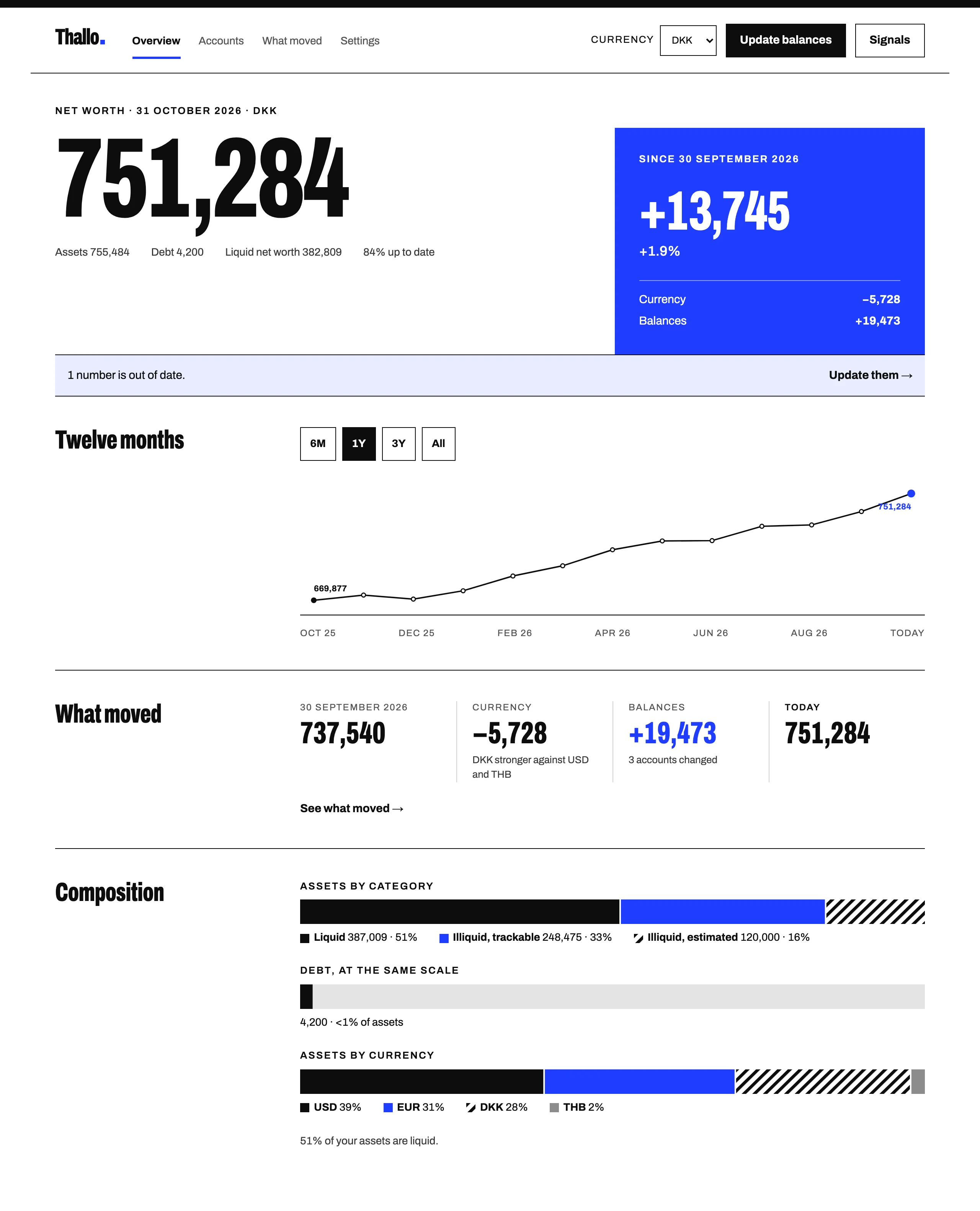
The overview shows your net worth now, the change since last month-end, total assets and total debt. Below that are a 12-month line and breakdowns by category and by currency. In the example, net worth on 31 October is DKK 751,284, up DKK 13,745 since 30 September, with DKK 755,484 in assets and DKK 4,200 in debt. The largest share of the assets, 39%, is in dollars.
What moved
Pick two dates and Thallo splits the change between them into two parts.
- Currency effect: the part caused by exchange rates
- Balance changes: the part caused by your balances going up or down
The currency effect is worked out as old balance × (new rate − old rate), and balance changes as (new balance − old balance) × new rate.
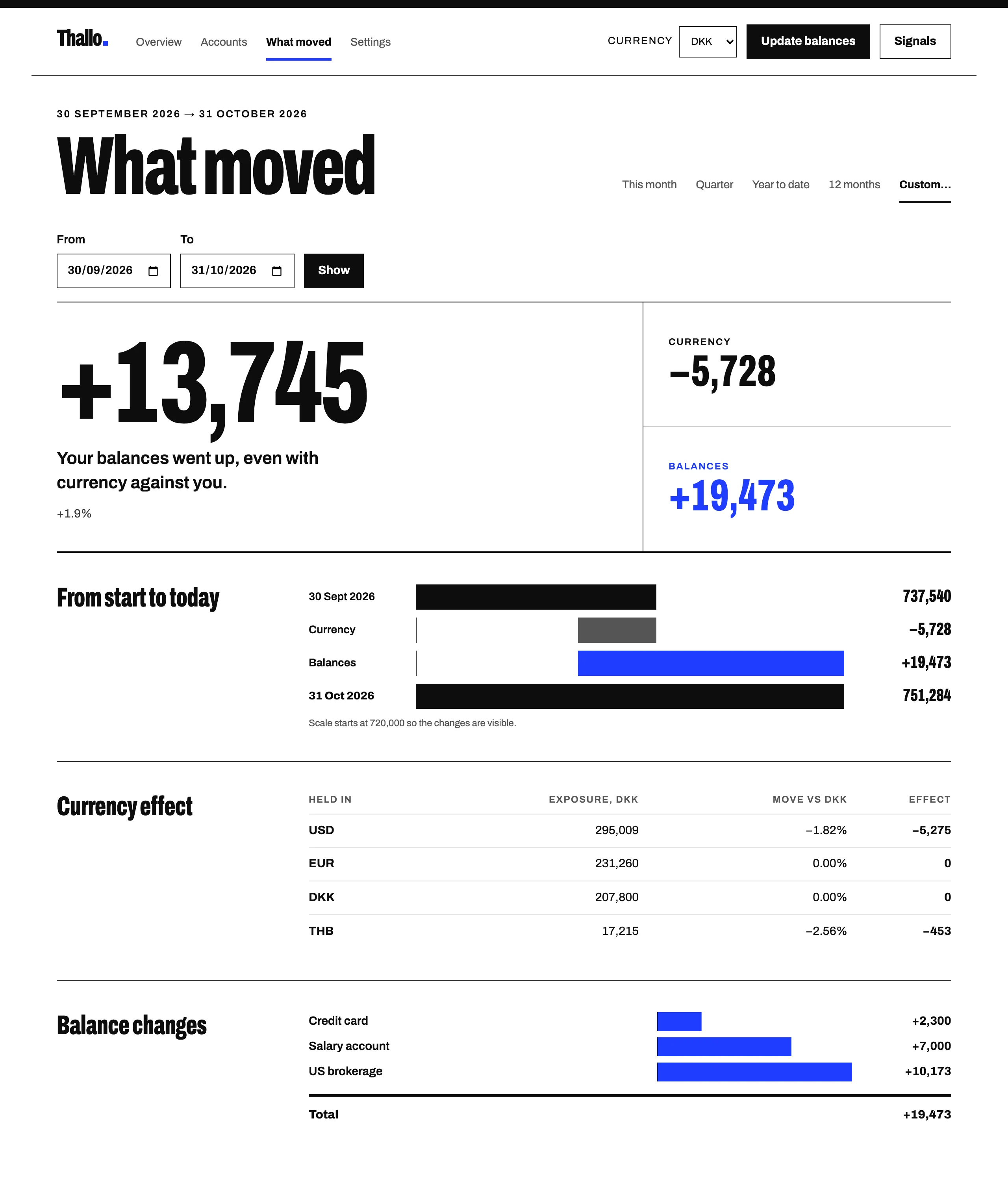
From 30 September to 31 October in the example, the salary account went from DKK 85,000 to 92,000, the brokerage from USD 42,000 to 43,500, and the amount owed on the card went down from DKK 6,500 to 4,200. The other accounts didn't change in their own currencies.
Account by account, the split looks like this. The What moved screen groups the currency effect by currency instead, and lists only the accounts whose balance changed.
| Account | Currency effect | Balance changes |
|---|---|---|
| Salary account (DKK) | 0 | 7,000 |
| US brokerage (USD) | −5,275 | 10,173 |
| Rental deposit (THB) | −453 | 0 |
| Pension (EUR) | 0 | 0 |
| Car (DKK) | 0 | 0 |
| Credit card (DKK) | 0 | 2,300 |
| Total | −5,728 | 19,473 |
Net worth went from DKK 737,540 to 751,284, which is DKK 13,745 more. Your balances went up by DKK 19,473 in that time, and the weaker dollar and baht reduced the total by DKK 5,728. The two columns always add up to the total change, give or take rounding.
Paying down the card counts as a positive balance change, because debt is subtracted from the total.
Out-of-date accounts
Each account shows when you last updated it, and gets marked as out of date once it's been longer than its update rhythm. The overview turns this into a percentage of your total that's up to date.
In the example, the car estimate is from last year, so it's past its yearly rhythm. The car is DKK 120,000 of DKK 755,484 in assets, which means the overview shows "84% up to date". Your own estimates are marked with ≈, so the car appears as ≈ DKK 120,000.
Liquid net worth and ratios
The overview shows your liquid net worth and two ratios. Liquid net worth is your liquid accounts minus your debt, which comes to DKK 382,809 in the example. The liquid share of assets is DKK 387,009 of 755,484, or 51%, and debt to assets is DKK 4,200 of 755,484, which is under 1%.
Signals
Signals are on by default. Once a week they list three to five things in your numbers that are worth a look, for example:
- "The dollar fell against your display currency this month. That cost you DKK 5,275."
- "Your car's value hasn't changed in 12 months."
- "These two accounts moved in opposite directions. Did you move money between them?"
Thallo's own code finds these and calculates every figure. An AI model (Claude, from Anthropic) chooses which ones to show and writes the sentences, but it doesn't calculate anything, and Signals never give investment advice.
While Signals are on, a summary of your figures is sent to Anthropic to write them: account names, amounts and dates, but no notes, institutions, statements or logins. The app tells you this, and you can turn Signals off in Settings.
Currencies and exchange rates
Exchange rates
Rates are fetched every day from a free public service, Frankfurter, which publishes rates from central banks and official sources. Thallo stores them, which is how it can work out your total for any past date.
Display currency
You pick one currency for the total and can change it whenever you like. At the end-of-October rates, the example accounts come to DKK 751,284, or about USD 110,779.
Net worth on any date
For any date, Thallo takes the latest balance you have for each account and converts it at that date's exchange rate.
This means an account you haven't updated can still change in value. The Bangkok deposit in the example stayed at THB 90,000 through October, but the baht weakened about 2.6% against the krone, so in kroner the deposit went from DKK 17,668 to DKK 17,215. Thallo counts that DKK 453 as a fall in your net worth, because your total is in kroner. The USD 42,000 already in the brokerage on 30 September lost DKK 5,275 the same way, which is the currency effect in the What moved table.
Exporting and deleting your data
You can download everything as CSV files at any time. Export is free now and will stay free on every plan once Thallo starts charging.
Deleting your account removes everything permanently. For 7 days afterwards, signing back in cancels the deletion.
Signing in
Thallo uses Auth0, a dedicated sign-in service, for signing in. You can use a passkey (Face ID, Touch ID, Windows Hello, or a password manager like 1Password), Google, Apple, or an email and password. Thallo never sees or stores your password.
Thallo runs in the browser on your phone and computer. There's no native app yet.
Getting started
Most people start with their main bank account, their brokerage and anything in another currency. You'll see your first total in a few minutes, and you can add the rest later.